The pam_smbpass PAM module can be used to sync users’ Samba passwords with their system passwords. If a user invokes the passwd command, the password he uses to log in to the system as well as the password he must provide to connect to a Samba share are changed.
To enable this feature, add the following line to /etc/pam.d/system-auth below the pam_cracklib.so invocation:
password required /lib/security/pam_smbpass.so nullok use_authtok try_first_pass
system-auth - Common configuration file for PAMified services written by authconfig(8). The purpose of this configuration file is to provide common configuration file for all applications and service daemons calling PAM library.
11/20/2008

8/28/2008
Vim summary Part 1
The two basic modes are called Normal mode and Insert mode. In Normal mode the characters you type are commands. In Insert mode the characters are inserted as text.
Normal -> i -> Insert
Insert -> 'ESC' -> Normal
In Normal node, you can move around by using these keys:
h left *hjkl*
j down
k up
l right
We can use a count "n" to repeat n times of the command
To delete a character, move the cursor over it and type "nx"
To delete a whole line use the "ndd" command
To delete a line break move the cursor to the first line and press "nJ"
The "u" command indoes the last edit
"CTRL-R" (redo) to reverse the preceding command
"i" command inserts a character before the character under the cursor.
"a" append a character after the character under the cursor.
The "o" command creates a new, empty line below the cursor and puts Vim in Insert mode.
The "O" command (uppercase) opens a line above the cursor.
"ZZ" writes the files and exits
"w" move the cursor forward one word
"e" command that moves to the next end of a word
"b" command moves backward to the start of the previous word
"ge" command moves to the previous end of a word
"$" command moves the cursor to the end of a line.
"^" command moves to the first non-blank character of the line.
"0" command (zero) moves to the very first character of the line.
"fx" searches forward in the line for the single character x.
"Fx" searches backward in the line for the single character x.
"tx" command works like the "fx" command, except it stops one character before the searched character.
"Tx" searches backward in the line except it stops one character before the searched character.
"xG" positions you at the given line number
"gg" start of a gile
"G" end of the file
"H" screen top
"M" screen middle
"L" screen botto"CTRL-U" command scrolls up half a screen of text.
"CTRL-D" command scrolls down half a screen in the file,
"CTRL-E" scroll up one line
"CTRL-Y" scroll up one line
"CTRL-F" scroll forward by a whole screen (except for two lines)
"CTRL-B" scroll backward by a whole screen
"*" command. Vim will grab the word under the cursor and use it as the search string. Same as "/"
"#" command. Vim will grab the word under the cursor and use it as the search string. Same as "?"
The "\>" item is a special marker that only matches at the end of a word.
Similarly "\<" only matches at the begin of a word.
The . (dot) character matches any existing character. If you really want to match a dot, you must avoid its special meaning by putting a "\" before it.
The command "ma" marks the place under the cursor as mark a. You can place 26 marks (a through z) in your text. You can't see them, it's just a position that Vim remembers. To go to a mark, use the command `{mark}, where "{mark} is the mark letter.
":marks" to get a list of marks
Visual mode
"v" start Visual mode. You move the cursor over the text you want to work on. While you do this, the text is highlighted. Finally type the operator command.
"CTRL-v" start Visual mode. It works on a rectangular block of characters.
"o" If you have selected some text in Visual mode, and discover that you need to change the other end of the selection, use the "o" command. The cursor will go to the other end, and you can move the cursor to change where the selection starts.
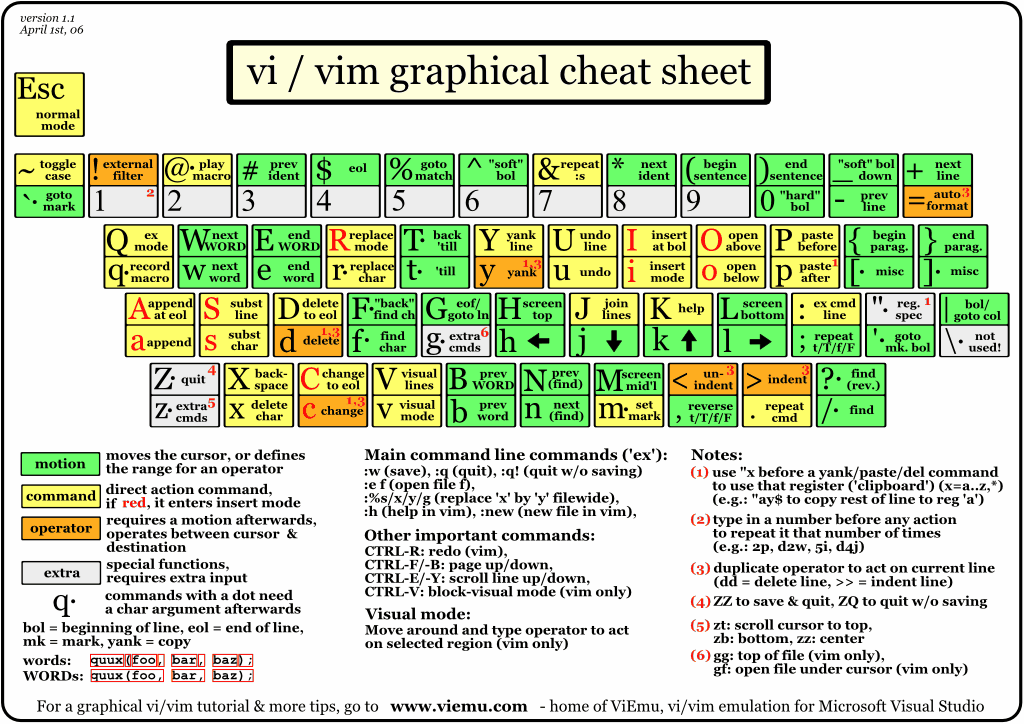
VIM cheat sheet reference
http://www.viemu.com/vi-vim-cheat-sheet.gif
Normal -> i -> Insert
Insert -> 'ESC' -> Normal
In Normal node, you can move around by using these keys:
h left *hjkl*
j down
k up
l right
We can use a count "n" to repeat n times of the command
To delete a character, move the cursor over it and type "nx"
To delete a whole line use the "ndd" command
To delete a line break move the cursor to the first line and press "nJ"
The "u" command indoes the last edit
"CTRL-R" (redo) to reverse the preceding command
"i" command inserts a character before the character under the cursor.
"a" append a character after the character under the cursor.
The "o" command creates a new, empty line below the cursor and puts Vim in Insert mode.
The "O" command (uppercase) opens a line above the cursor.
"ZZ" writes the files and exits
"w" move the cursor forward one word
"e" command that moves to the next end of a word
"b" command moves backward to the start of the previous word
"ge" command moves to the previous end of a word
"$" command moves the cursor to the end of a line.
"^" command moves to the first non-blank character of the line.
"0" command (zero) moves to the very first character of the line.
"fx" searches forward in the line for the single character x.
"Fx" searches backward in the line for the single character x.
"tx" command works like the "fx" command, except it stops one character before the searched character.
"Tx" searches backward in the line except it stops one character before the searched character.
"xG" positions you at the given line number
"gg" start of a gile
"G" end of the file
"H" screen top
"M" screen middle
"L" screen botto"CTRL-U" command scrolls up half a screen of text.
"CTRL-D" command scrolls down half a screen in the file,
"CTRL-E" scroll up one line
"CTRL-Y" scroll up one line
"CTRL-F" scroll forward by a whole screen (except for two lines)
"CTRL-B" scroll backward by a whole screen
"*" command. Vim will grab the word under the cursor and use it as the search string. Same as "/"
"#" command. Vim will grab the word under the cursor and use it as the search string. Same as "?"
The "\>" item is a special marker that only matches at the end of a word.
Similarly "\<" only matches at the begin of a word.
The . (dot) character matches any existing character. If you really want to match a dot, you must avoid its special meaning by putting a "\" before it.
The command "ma" marks the place under the cursor as mark a. You can place 26 marks (a through z) in your text. You can't see them, it's just a position that Vim remembers. To go to a mark, use the command `{mark}, where "{mark} is the mark letter.
":marks" to get a list of marks
Visual mode
"v" start Visual mode. You move the cursor over the text you want to work on. While you do this, the text is highlighted. Finally type the operator command.
"CTRL-v" start Visual mode. It works on a rectangular block of characters.
"o" If you have selected some text in Visual mode, and discover that you need to change the other end of the selection, use the "o" command. The cursor will go to the other end, and you can move the cursor to change where the selection starts.
VIM cheat sheet reference
http://www.viemu.com/vi-vim-cheat-sheet.gif
8/10/2008
TCP/IP model and Data Encapsulation
The TCP/IP architectural model has four layers
1. Application Layer - HTTP, HTTPS, SMTP, POP3, FTP and etc.
2. Transport Layer - TCP, UDP and etc.
3. Network Layer - IP, ICMP, IGMP, IPSec and etc.
4. Link Layer - ARP, RARP, MAC and etc.
Data Encapsulation
1. HTTP: DATA
2. TCP/UDP: TCP DATA
3. IP: IP TCP DATA
4. MAC Address: MAC IP TCP DATA
1. Application Layer - HTTP, HTTPS, SMTP, POP3, FTP and etc.
2. Transport Layer - TCP, UDP and etc.
3. Network Layer - IP, ICMP, IGMP, IPSec and etc.
4. Link Layer - ARP, RARP, MAC and etc.
Data Encapsulation
1. HTTP: DATA
2. TCP/UDP: TCP DATA
3. IP: IP TCP DATA
4. MAC Address: MAC IP TCP DATA
7/22/2008
Make an ISO Image
To make an ISO from your CD/DVD, place the media in your drive but don't mount it. If it automounts, unmount it.
dd if=/dev/dvd of=dvd.iso # for dvd
dd if=/dev/cdrom of=cd.iso # for cdrom
dd if=/dev/scd0 of=cd.iso # if cdrom is scsi
To make an ISO from files on your hard drive, create a directory which holds the files you want. Then use the mkisofs command.
mkisofs -o /tmp/cd.iso /tmp/directory/
This results in a file called cd.iso in folder /tmp which contains all the files and directories in /tmp/directory/.
dd if=/dev/dvd of=dvd.iso # for dvd
dd if=/dev/cdrom of=cd.iso # for cdrom
dd if=/dev/scd0 of=cd.iso # if cdrom is scsi
To make an ISO from files on your hard drive, create a directory which holds the files you want. Then use the mkisofs command.
mkisofs -o /tmp/cd.iso /tmp/directory/
This results in a file called cd.iso in folder /tmp which contains all the files and directories in /tmp/directory/.
6/29/2008
VMware 1.06 on Ubuntu 8.04
Platform: Ubuntu 8.04
Software: VMWare 1.06
1. Install all needed packages
sudo apt-get install build-essential linux-headers-`uname -r` xinetd
2. Download VMware 1.06 and place it in an instalation directory (/usr/local/src)
3. Extract and install VMware
cd /usr/local/src/
tar zxvf VMware-server-1.0.6-91891.tar.gz
cd vmware-server-distrib
sudo ./vmware-install.pl
select default
4. Post installation
sudo cp /lib/libgcc_s.so.1 /usr/lib/vmware/lib/libgcc_s.so.1
sudo cp /usr/lib/libpng12.so.0 /usr/lib/vmware/lib/libpng12.so.0
Enable USB devices
1. Enable USB device sharing
gedit gedit /etc/fstab
# USB for vmware
none /proc/bus/usb usbfs devgid=46,devmode=664 0 0
2. Reboot and re-start VMWare Server.
3. Add usb controller for guest.
4. Start your guest
"VM" -> Removable devices -> USB devices -> Select the USB device to share with your guest.
Software: VMWare 1.06
1. Install all needed packages
sudo apt-get install build-essential linux-headers-`uname -r` xinetd
2. Download VMware 1.06 and place it in an instalation directory (/usr/local/src)
3. Extract and install VMware
cd /usr/local/src/
tar zxvf VMware-server-1.0.6-91891.tar.gz
cd vmware-server-distrib
sudo ./vmware-install.pl
select default
4. Post installation
sudo cp /lib/libgcc_s.so.1 /usr/lib/vmware/lib/libgcc_s.so.1
sudo cp /usr/lib/libpng12.so.0 /usr/lib/vmware/lib/libpng12.so.0
Enable USB devices
1. Enable USB device sharing
gedit gedit /etc/fstab
# USB for vmware
none /proc/bus/usb usbfs devgid=46,devmode=664 0 0
2. Reboot and re-start VMWare Server.
3. Add usb controller for guest.
4. Start your guest
"VM" -> Removable devices -> USB devices -> Select the USB device to share with your guest.
Mount an ISO/IMG image under Linux
Platform: Ubuntu 8.04
1. Create an mount point (e.g. floppy)
sudo mkdir -p /mnt/floppy
2. Use mount command to mount image
sudo mount -o loop floppy.img /mnt/floppy
3. Change dir to list content
cd /mnt/floppy
1. Create an mount point (e.g. floppy)
sudo mkdir -p /mnt/floppy
2. Use mount command to mount image
sudo mount -o loop floppy.img /mnt/floppy
3. Change dir to list content
cd /mnt/floppy
6/11/2008
How to install and setup Eclipse with Sun’s Java and PyDev
Platform: Ubuntu 8.04
1. Install Sun's java in Ubuntu
apt-get install sun-java6-jdk
2. Make Sun's java as default
sudo update-java-alternatives -s java-6-sun
3. Download Eclipse classic 3.3.2 from http://www.eclipse.org/downloads/
4. Install Eclipse in my home dir
cd ~
tar zxvf eclipse-SDK-3.3.2-linux-gtk.tar.gz
5. Installing Pydev with the update site
Help->Software Updates->Find and Install
Select "Search for new features for install"
Click "new remote site"
Set the 'Pydev Extensions' update site: http://www.fabioz.com/pydev/updates
Click "Finish"
Select both features and click "next"
Accept the license, click "next" and in the next screen, review it and click "finish"
6. Checking the installation
help->about->plug in details and checking if there are at least 5 plugins with the 'plug-in Id' starting with 'com.python.pydev' and at least other 5 starting with 'org.python.pydev' (and check if they have the version you got).
1. Install Sun's java in Ubuntu
apt-get install sun-java6-jdk
2. Make Sun's java as default
sudo update-java-alternatives -s java-6-sun
3. Download Eclipse classic 3.3.2 from http://www.eclipse.org/downloads/
4. Install Eclipse in my home dir
cd ~
tar zxvf eclipse-SDK-3.3.2-linux-gtk.tar.gz
5. Installing Pydev with the update site
Help->Software Updates->Find and Install
Select "Search for new features for install"
Click "new remote site"
Set the 'Pydev Extensions' update site: http://www.fabioz.com/pydev/updates
Click "Finish"
Select both features and click "next"
Accept the license, click "next" and in the next screen, review it and click "finish"
6. Checking the installation
help->about->plug in details and checking if there are at least 5 plugins with the 'plug-in Id' starting with 'com.python.pydev' and at least other 5 starting with 'org.python.pydev' (and check if they have the version you got).
4/17/2008
Locking Mozilla Firefox Setting - By GPO
Downlaod FrontMotion firefox from
http://www.frontmotion.com/FMFirefoxCE/download_fmfirefoxce.htm
1. Download and Load firefox.adm to GPO
2. Setting the homepage
using firefox.adm set General Settings
3. Proxy Server
using firefox.adm set Proxy Settings
Enable setting
Set HTTP proxy server address or Ip
Set HTTP Proxy server port
Copy same setting to SSL Proxy, FTP proxy and Gopher proxy.
Set Socket version to 5
Set Manual Setting to localhost, 127.0.0.1, 192.168.1.0/24
5 Disable XPI installed
Done
http://www.frontmotion.com/FMFirefoxCE/download_fmfirefoxce.htm
1. Download and Load firefox.adm to GPO
2. Setting the homepage
using firefox.adm set General Settings
3. Proxy Server
using firefox.adm set Proxy Settings
Enable setting
Set HTTP proxy server address or Ip
Set HTTP Proxy server port
Copy same setting to SSL Proxy, FTP proxy and Gopher proxy.
Set Socket version to 5
Set Manual Setting to localhost, 127.0.0.1, 192.168.1.0/24
5 Disable XPI installed
Done
4/16/2008
Locking Mozilla Firefox Setting
Locking Mozilla Firefox Setting
1. Create a file anywhere on your hard drive, called mozilla.txt
2. Edit mozilla.txt in text editor and begin the firest line with 2 forward slashes.
3. Use lockPref instead of user_pref. They should be in the same form as you see in your profile's prefs.js file. For ex. // lockPref("network.proxy.type", 0); lockPref("browser.startup.homepage", "http://www.google.com/");
4. The file must be encoded and renamed. The encoding is a simple “byte-shifting” with an offset of 13. Online encoder http://www.alain.knaff.lu/%7Eaknaff/howto/MozillaCustomization/cgi/byteshf.cgi
5. The resulting file should be named mozilla.cfg. Save that in the same directory as firefox.exe. 6. In C:\Program Files\Mozilla Firefox\greprefs\ there’s a file called all.js. Open all.js in a text editor, and add the following line at the end of it: pref("general.config.filename", "mozilla.cfg");
Mozilla.txt example
//
lockPref("network.proxy.type",1);
lockPref("network.proxy.http", "192.168.1.31");
lockPref("network.proxy.http_port", 9999);
lockPref("network.proxy.ssl", "192.168.1.31");
lockPref("network.proxy.ssl_port", 9999);
lockPref("network.proxy.gopher", "192.168.1.31");
lockPref("network.proxy.gopher_port", 9999);
lockPref("network.proxy.socks", "192.168.1.31");
lockPref("network.proxy.socks_port", 9999);
lockPref("network.proxy.no_proxies_on", "localhost, 127.0.0.1, 192.168.1.0/24");
lockPref("network.proxy.share_proxy_settings", true);
1. Create a file anywhere on your hard drive, called mozilla.txt
2. Edit mozilla.txt in text editor and begin the firest line with 2 forward slashes.
3. Use lockPref instead of user_pref. They should be in the same form as you see in your profile's prefs.js file. For ex. // lockPref("network.proxy.type", 0); lockPref("browser.startup.homepage", "http://www.google.com/");
4. The file must be encoded and renamed. The encoding is a simple “byte-shifting” with an offset of 13. Online encoder http://www.alain.knaff.lu/%7Eaknaff/howto/MozillaCustomization/cgi/byteshf.cgi
5. The resulting file should be named mozilla.cfg. Save that in the same directory as firefox.exe. 6. In C:\Program Files\Mozilla Firefox\greprefs\ there’s a file called all.js. Open all.js in a text editor, and add the following line at the end of it: pref("general.config.filename", "mozilla.cfg");
Mozilla.txt example
//
lockPref("network.proxy.type",1);
lockPref("network.proxy.http", "192.168.1.31");
lockPref("network.proxy.http_port", 9999);
lockPref("network.proxy.ssl", "192.168.1.31");
lockPref("network.proxy.ssl_port", 9999);
lockPref("network.proxy.gopher", "192.168.1.31");
lockPref("network.proxy.gopher_port", 9999);
lockPref("network.proxy.socks", "192.168.1.31");
lockPref("network.proxy.socks_port", 9999);
lockPref("network.proxy.no_proxies_on", "localhost, 127.0.0.1, 192.168.1.0/24");
lockPref("network.proxy.share_proxy_settings", true);
3/11/2008
Creating a Local Update Repository for FC6
Creating a Local Update Repository for FC6
#------------------------------------------------------------------------------
# Pre Install
#------------------------------------------------------------------------------
mkdir -p /root/fc6base
cp /mnt/Fedora/RPMS/*.* /root/fc6base/
cp /mnt/repodata/comps.xml /root/fc6base
#------------------------------------------------------------------------------
# Install createrepo
#------------------------------------------------------------------------------
rpm -Uvh /mnt/Fedora/RPMS/createrepo*
createrepo /root/fc6base
createrepo -g comps.xml /root/fc6base
#When you use yum grouplist and it doesn't show anything. run
yum clean metadata
#------------------------------------------------------------------------------
# Edit Yum Configuration
#------------------------------------------------------------------------------
vi /etc/yum.repos.d/fedora-core.repo
#comment out any line starting with baseurl or mirrorlist
#add line on core
baseurl=file:///root/fc6base
#disable gpgcheck on core
gpgcheck=1
to
gpgcheck=0
#------------------------------------------------------------------------------
# Disable other repository
#------------------------------------------------------------------------------
#make sure other repo is disable if not it will try to connect to internet
cd /etc/yum.repos.d/
#change every *.repo except fedora-core.repo
enabled=1
to
enabled=0
#------------------------------------------------------------------------------
# Post Install
#------------------------------------------------------------------------------
mkdir -p /root/fc6base
cp /mnt/Fedora/RPMS/*.* /root/fc6base/
cp /mnt/repodata/comps.xml /root/fc6base
#------------------------------------------------------------------------------
# Install createrepo
#------------------------------------------------------------------------------
rpm -Uvh /mnt/Fedora/RPMS/createrepo*
createrepo /root/fc6base
createrepo -g comps.xml /root/fc6base
#When you use yum grouplist and it doesn't show anything. run
yum clean metadata
#------------------------------------------------------------------------------
# Edit Yum Configuration
#------------------------------------------------------------------------------
vi /etc/yum.repos.d/fedora-core.repo
#comment out any line starting with baseurl or mirrorlist
#add line on core
baseurl=file:///root/fc6base
#disable gpgcheck on core
gpgcheck=1
to
gpgcheck=0
#------------------------------------------------------------------------------
# Disable other repository
#------------------------------------------------------------------------------
#make sure other repo is disable if not it will try to connect to internet
cd /etc/yum.repos.d/
#change every *.repo except fedora-core.repo
enabled=1
to
enabled=0
#------------------------------------------------------------------------------
# Pre Install
#------------------------------------------------------------------------------
mkdir -p /root/fc6base
cp /mnt/Fedora/RPMS/*.* /root/fc6base/
cp /mnt/repodata/comps.xml /root/fc6base
#------------------------------------------------------------------------------
# Install createrepo
#------------------------------------------------------------------------------
rpm -Uvh /mnt/Fedora/RPMS/createrepo*
createrepo /root/fc6base
createrepo -g comps.xml /root/fc6base
#When you use yum grouplist and it doesn't show anything. run
yum clean metadata
#------------------------------------------------------------------------------
# Edit Yum Configuration
#------------------------------------------------------------------------------
vi /etc/yum.repos.d/fedora-core.repo
#comment out any line starting with baseurl or mirrorlist
#add line on core
baseurl=file:///root/fc6base
#disable gpgcheck on core
gpgcheck=1
to
gpgcheck=0
#------------------------------------------------------------------------------
# Disable other repository
#------------------------------------------------------------------------------
#make sure other repo is disable if not it will try to connect to internet
cd /etc/yum.repos.d/
#change every *.repo except fedora-core.repo
enabled=1
to
enabled=0
#------------------------------------------------------------------------------
# Post Install
#------------------------------------------------------------------------------
mkdir -p /root/fc6base
cp /mnt/Fedora/RPMS/*.* /root/fc6base/
cp /mnt/repodata/comps.xml /root/fc6base
#------------------------------------------------------------------------------
# Install createrepo
#------------------------------------------------------------------------------
rpm -Uvh /mnt/Fedora/RPMS/createrepo*
createrepo /root/fc6base
createrepo -g comps.xml /root/fc6base
#When you use yum grouplist and it doesn't show anything. run
yum clean metadata
#------------------------------------------------------------------------------
# Edit Yum Configuration
#------------------------------------------------------------------------------
vi /etc/yum.repos.d/fedora-core.repo
#comment out any line starting with baseurl or mirrorlist
#add line on core
baseurl=file:///root/fc6base
#disable gpgcheck on core
gpgcheck=1
to
gpgcheck=0
#------------------------------------------------------------------------------
# Disable other repository
#------------------------------------------------------------------------------
#make sure other repo is disable if not it will try to connect to internet
cd /etc/yum.repos.d/
#change every *.repo except fedora-core.repo
enabled=1
to
enabled=0
Installing Bugzilla on Redhat 9
Bugzilla on RH9
-------------------------------------------------------------------------------
Install RH9 Packages
-------------------------------------------------------------------------------
> Make ISO files for RH9 to the local disk (i.e.: /root/software/RedHatISO/)
dd if=/dev/cdrom of=/root/Software/RedhatISO/cdrom_image.iso
> To update packages.
system-config-packages --isodir=/root/software/RedHatISO/
#------------------------------------------------------------------------------
# Post Install
#------------------------------------------------------------------------------
> remove rpm packages
rpm -e httpd-manual;rpm -e redhat-config-httpd;rpm -e php-imap;rpm -e php-ldap;rpm -e mod_perl; rpm -e mod_ssl;rpm -e mod_python;rpm -e webalizer;
rpm -e php; rpm -e httpd
>Downlaod apache, openssl, php
>Install openssl
tar zxvf openssl-0.9.8e.tar.gz;
cd openssl-0.9.8e
./config; make; make install
#------------------------------------------------------------------------------
# Apache 2.2.24 Setup
#------------------------------------------------------------------------------
tar zxvf httpd-2.2.4.tar.gz
cd httpd-2.2.4
./configure --prefix=/usr/local/apache_2.2.4 --enable-ssl --enable-so --enable-headers \
--enable-suexec --enable-usertrack --enable-headers --enable-mem-cache \
--enable-disk-cache --enable-cache --enable-file-cache --with-ssl=/usr/local/ssl; make; make install
groupadd apache
useradd -g apache apache
cd /usr/local
ln -s apache_2.2.4/ ./apache
chown -R apache.apache apache_2.2.4
>update httpd.conf and add the following
vi apache/conf/httpd.conf
AddHandler cgi-script .cgi
Options +Indexes +ExecCGI
DirectoryIndex index.cgi
AllowOverride Limit
#------------------------------------------------------------------------------
# Mysql standard 4.1.22 Setup
#------------------------------------------------------------------------------
groupadd mysql
useradd -g mysql mysql
cp mysql-standard-4.1.22-pc-linux-gnu-i686.tar.gz /usr/local
cd ..
tar zxvf mysql-standard-4.1.22-pc-linux-gnu-i686.tar.gz
ln -s ./mysql-standard-4.1.22-pc-linux-gnu-i686/ ./mysql
cd mysql
chown -R mysql .
chgrp -R mysql .
>Setup mysql DB
scripts/mysql_install_db --user=mysql
chown -R root .
chown -R mysql data
cp support-files/my-medium.cnf /etc/my.cnf
echo "/usr/local/mysql/lib" >> /etc/ld.so.conf
ldconfig -v
cp support-files/mysql.server /etc/init.d/mysql
service mysql start
>Setup mysql root password
bin/mysqladmin -u root password 'password'
#------------------------------------------------------------------------------
> Configure database permissions
bin/mysql
#Run the following SQL command:
GRANT SELECT, INSERT, UPDATE, DELETE, INDEX, ALTER, CREATE, LOCK TABLES, CREATE TEMPORARY TABLES, DROP, REFERENCES ON bugs.* TO bugs@'%' IDENTIFIED BY 'bugs';
GRANT SELECT, INSERT, UPDATE, DELETE, INDEX, ALTER, CREATE, LOCK TABLES, CREATE TEMPORARY TABLES, DROP, REFERENCES ON bugs.* TO bugs@localhost IDENTIFIED BY 'bugs';
FLUSH PRIVILEGES;
# -----------------------------------------------------------
# INSTALL Bugzilla 3.0
# -----------------------------------------------------------
cd /usr/local/apache/htdocs
tar -zxvf ~/bugzilla-3.0.tar.gz
mv bugzilla-3.0 bugzilla
cd bugzilla
----------------------------------------------------------------------------------
Prepare for CPAN
----------------------------------------------------------------------------------
mkdir .cpan
cd .cpan
mkdir sources
cd sources
cp ~/MIRRORED.BY .
#With MIRRORED.BY included the followings
------------------------------------------------------
cpan.archive.hk:
frequency = "daily"
dst_ftp = ""
dst_http = "http://www.archive.hk/cpan/"
dst_location = "Pokfulam, Hong Kong, Asia (21.75 115)"
dst_organisation = "Archive.hk"
dst_timezone = "+8"
dst_bandwidth = "OC3"
dst_contact = "archive.hk]admin"
dst_src = "ftp.funet.fi"
# dst_dst = "http://www.archive.hk/cpan/"
# dst_contact = "mailto:archive.hk]admin
# dst_src = "ftp.funet.fi"
cuhk.edu.hk:
frequency = "daily"
dst_ftp = "ftp://ftp.cuhk.edu.hk/pub/packages/perl/CPAN/"
dst_http = "http://ftp.cuhk.edu.hk/pub/packages/perl/CPAN/"
dst_location = "Hong Kong, Shatin, Hong Kong, Asia (22.42 114.2)"
dst_organisation = "The Chinese University of Hong Kong"
dst_timezone = "+8"
dst_bandwidth = "1Gbps"
dst_contact = "ftp.cuhk.edu.hk]ftp-admin"
dst_src = "ftp://mirrors.hknet.com/CPAN"
# dst_dst = "ftp://ftp.cuhk.edu.hk/pub/packages/perl/CPAN/"
# dst_contact = "mailto:ftp.cuhk.edu.hk]ftp-admin
# dst_src = "ftp://mirrors.hknet.com/CPAN"
--------------------------------------------------------------
----------------------------------------------------------------------------------
INSTALL DBI-1.46
----------------------------------------------------------------------------------
>Must Set LANG=""
LANG=""
>or
unset LANG
cd /usr/local/
tar -zxvf ~/DBI-1.4.6
cd DBI-1.4.6
perl ./Makefile.PL
make
make test
make install
----------------------------------------------------------------------------------
INSTALL DBD-MYSQL (Manual install)
----------------------------------------------------------------------------------
cd /usr/local/
tar -zxvf DBD-mysql-2.9004.tar.gz
cd DBD-mysql-2.9004
#unset LANG; perl Makefile.PL --libs="-L/usr/local/mysql/lib/ -lmysqlclient -lz" --cflags=-I/usr/local/mysql/include --testuser=root --testpassword=Password --testhost=localhost
unset LANG; perl Makefile.PL --libs="-L/usr/local/mysql/lib/ -lmysqlclient -lz -lcrypt -lnsl -lm" --cflags=-I/usr/local/mysql/include --testhost=localhost --testuser=root --testpassword=password
make
make test
make install
# -----------------------------------------------------------
# INSTALL Perl Modules
# -----------------------------------------------------------
perl -MCPAN -e 'install "Bundle::Bugzilla"'
perl -MCPAN -e 'install Email::Send'
perl -MCPAN -e 'install Email::MIME::Modifier'
perl -MCPAN -e 'install PatchReader'
perl -MCPAN -e 'install Apache::DBI'
perl -MCPAN -e 'install Net::LDAP'
----------------------------------------------------------------------------------
INSTALL mod_perl
----------------------------------------------------------------------------------
cd /usr/local/
tar -zxvf ~/mod_perl-2.0.3
cd mod_perl-2.0.3
perl ./Makefile.PL
vi /usr/local/apache/conf/httpd.conf
LoadModule perl_module modules/mod_perl.so
make
make test
make install
----------------------------------------------------------------------------------
----------------------------------------------------------------------------------
Config Sendmail
----------------------------------------------------------------------------------
----------------------------------------------------------------------------------
cd /etc/mail/
cp sendmail.mc sendmail.mc.orginal
----------------------------------------------------------------------------------
# add dnl before the following line (hide original sender)
#There are always users that need to be "exposed" -- that is,
#their internal site name should be displayed instead of the masquerade name.
#Root is an example (which has been "exposed" by default prior to 8.10).
#You can add users to this list using
#enable by default
#disable this to show the "masquerade name" instead of "internal site name"
dnl EXPOSED_USER(`root')dnl
dnl # The following causes sendmail to only listen on the IPv4 loopback address
dnl # 127.0.0.1 and not on any other network devices. Remove the loopback
dnl # address restriction to accept email from the internet or intranet.
dnl #
dnl DAEMON_OPTIONS(`Port=smtp,Addr=127.0.0.1, Name=MTA')dnl
----------------------------------------------------------------------------------
#For example,if you have:
#MASQUERADE_AS(`masq.com') MASQUERADE_DOMAIN(`foo.org') MASQUERADE_DOMAIN(`bar.com')
#then *foo.org and *bar.com are converted to masq.com.
#Without this feature, only foo.org and bar.com are masqueraded.
#Add following line at the bottom of the file before "MAILER"
FEATURE(masquerade_entire_domain)dnl
define(`MAIL_HUB',`mail.domain.com.')
----------------------------------------------------------------------------------
vi /etc/mail/local-host-names
# local-host-names - include all aliases for your machine here.
Add host name that can receive mail
----------------------------------------------------------------------------------
Rebuild sendmail.cf file
----------------------------------------------------------------------------------
cp /etc/mail/sendmail.cf /etc/mail/bak.sendmail.cf
m4 /etc/mail/sendmail.mc > /etc/mail/sendmail.cf
service sendmail stop
service sendmail start
# -----------------------------------------------------------
# Configure Bugzilla
# -----------------------------------------------------------
> Verify dependencies of bugzilla
cd /usr/local/apache/htdocs/bugzilla/
./checksetup.pl
vi localconfig
> NOTE: bugzilla uses the following variaqble to log into the database in "localconfig" create later
#update the variable $db_pass = 'bugs'; --> the same passwd as your sql command
> if successful, you will see the following message
Enter the e-mail address of the administrator: user@domain.com
Enter the real name of the administrator: alex.fung
Enter a password for the administrator account:
Please retype the password to verify:
user@domain.com is now set up as an administrator.
Creating default classification 'Unclassified'...
Creating initial dummy product 'TestProduct'...
Now that you have installed Bugzilla, you should visit the
'Parameters' page (linked in the footer of the Administrator
account) to ensure it is set up as you wish - this includes
setting the 'urlbase' option to the correct url.
chown -R apache.apache bugzilla
# -----------------------------------------------------------
#Install PHP
# -----------------------------------------------------------
tar zxvf php-4.4.6
cd /php-4.4.6
./configure --with-apxs2=/usr/local/apache/bin/apxs --with-mysql=/usr/local/mysql --with-openssl=/usr/local/ssl
make; make install
cp php-4.4.6/php.ini-recommended /usr/local/lib/php.ini
vi /usr/local/apache/conf/httpd.conf
>add index.php in DirectoryIndex
>AddType application/x-httpd-php .php
>LoadModule php4_module modules/libphp4.so
# -----------------------------------------------------------
#Create an user account in Windows AD
# -----------------------------------------------------------
User name: ldapuser
Password: ldappass
OU: Users
# -----------------------------------------------------------
#LDAP Setting in Bugzilla
# -----------------------------------------------------------
>LDAP Directory
LDAPserver: name.domain.com
LDAPbinddn: cn=ldapuser,cn=Users,dc=domain,dc=com:ldappass
LDAPBaseDN: dc=domain,dc=com
LDAPuidattribute: userPrincipalName
>User Authentication
user_verify_class: LDAP
-------------------------------------------------------------------------------
Install RH9 Packages
-------------------------------------------------------------------------------
> Make ISO files for RH9 to the local disk (i.e.: /root/software/RedHatISO/)
dd if=/dev/cdrom of=/root/Software/RedhatISO/cdrom_image.iso
> To update packages.
system-config-packages --isodir=/root/software/RedHatISO/
#------------------------------------------------------------------------------
# Post Install
#------------------------------------------------------------------------------
> remove rpm packages
rpm -e httpd-manual;rpm -e redhat-config-httpd;rpm -e php-imap;rpm -e php-ldap;rpm -e mod_perl; rpm -e mod_ssl;rpm -e mod_python;rpm -e webalizer;
rpm -e php; rpm -e httpd
>Downlaod apache, openssl, php
>Install openssl
tar zxvf openssl-0.9.8e.tar.gz;
cd openssl-0.9.8e
./config; make; make install
#------------------------------------------------------------------------------
# Apache 2.2.24 Setup
#------------------------------------------------------------------------------
tar zxvf httpd-2.2.4.tar.gz
cd httpd-2.2.4
./configure --prefix=/usr/local/apache_2.2.4 --enable-ssl --enable-so --enable-headers \
--enable-suexec --enable-usertrack --enable-headers --enable-mem-cache \
--enable-disk-cache --enable-cache --enable-file-cache --with-ssl=/usr/local/ssl; make; make install
groupadd apache
useradd -g apache apache
cd /usr/local
ln -s apache_2.2.4/ ./apache
chown -R apache.apache apache_2.2.4
>update httpd.conf and add the following
vi apache/conf/httpd.conf
AddHandler cgi-script .cgi
Options +Indexes +ExecCGI
DirectoryIndex index.cgi
AllowOverride Limit
#------------------------------------------------------------------------------
# Mysql standard 4.1.22 Setup
#------------------------------------------------------------------------------
groupadd mysql
useradd -g mysql mysql
cp mysql-standard-4.1.22-pc-linux-gnu-i686.tar.gz /usr/local
cd ..
tar zxvf mysql-standard-4.1.22-pc-linux-gnu-i686.tar.gz
ln -s ./mysql-standard-4.1.22-pc-linux-gnu-i686/ ./mysql
cd mysql
chown -R mysql .
chgrp -R mysql .
>Setup mysql DB
scripts/mysql_install_db --user=mysql
chown -R root .
chown -R mysql data
cp support-files/my-medium.cnf /etc/my.cnf
echo "/usr/local/mysql/lib" >> /etc/ld.so.conf
ldconfig -v
cp support-files/mysql.server /etc/init.d/mysql
service mysql start
>Setup mysql root password
bin/mysqladmin -u root password 'password'
#------------------------------------------------------------------------------
> Configure database permissions
bin/mysql
#Run the following SQL command:
GRANT SELECT, INSERT, UPDATE, DELETE, INDEX, ALTER, CREATE, LOCK TABLES, CREATE TEMPORARY TABLES, DROP, REFERENCES ON bugs.* TO bugs@'%' IDENTIFIED BY 'bugs';
GRANT SELECT, INSERT, UPDATE, DELETE, INDEX, ALTER, CREATE, LOCK TABLES, CREATE TEMPORARY TABLES, DROP, REFERENCES ON bugs.* TO bugs@localhost IDENTIFIED BY 'bugs';
FLUSH PRIVILEGES;
# -----------------------------------------------------------
# INSTALL Bugzilla 3.0
# -----------------------------------------------------------
cd /usr/local/apache/htdocs
tar -zxvf ~/bugzilla-3.0.tar.gz
mv bugzilla-3.0 bugzilla
cd bugzilla
----------------------------------------------------------------------------------
Prepare for CPAN
----------------------------------------------------------------------------------
mkdir .cpan
cd .cpan
mkdir sources
cd sources
cp ~/MIRRORED.BY .
#With MIRRORED.BY included the followings
------------------------------------------------------
cpan.archive.hk:
frequency = "daily"
dst_ftp = ""
dst_http = "http://www.archive.hk/cpan/"
dst_location = "Pokfulam, Hong Kong, Asia (21.75 115)"
dst_organisation = "Archive.hk"
dst_timezone = "+8"
dst_bandwidth = "OC3"
dst_contact = "archive.hk]admin"
dst_src = "ftp.funet.fi"
# dst_dst = "http://www.archive.hk/cpan/"
# dst_contact = "mailto:archive.hk]admin
# dst_src = "ftp.funet.fi"
cuhk.edu.hk:
frequency = "daily"
dst_ftp = "ftp://ftp.cuhk.edu.hk/pub/packages/perl/CPAN/"
dst_http = "http://ftp.cuhk.edu.hk/pub/packages/perl/CPAN/"
dst_location = "Hong Kong, Shatin, Hong Kong, Asia (22.42 114.2)"
dst_organisation = "The Chinese University of Hong Kong"
dst_timezone = "+8"
dst_bandwidth = "1Gbps"
dst_contact = "ftp.cuhk.edu.hk]ftp-admin"
dst_src = "ftp://mirrors.hknet.com/CPAN"
# dst_dst = "ftp://ftp.cuhk.edu.hk/pub/packages/perl/CPAN/"
# dst_contact = "mailto:ftp.cuhk.edu.hk]ftp-admin
# dst_src = "ftp://mirrors.hknet.com/CPAN"
--------------------------------------------------------------
----------------------------------------------------------------------------------
INSTALL DBI-1.46
----------------------------------------------------------------------------------
>Must Set LANG=""
LANG=""
>or
unset LANG
cd /usr/local/
tar -zxvf ~/DBI-1.4.6
cd DBI-1.4.6
perl ./Makefile.PL
make
make test
make install
----------------------------------------------------------------------------------
INSTALL DBD-MYSQL (Manual install)
----------------------------------------------------------------------------------
cd /usr/local/
tar -zxvf DBD-mysql-2.9004.tar.gz
cd DBD-mysql-2.9004
#unset LANG; perl Makefile.PL --libs="-L/usr/local/mysql/lib/ -lmysqlclient -lz" --cflags=-I/usr/local/mysql/include --testuser=root --testpassword=Password --testhost=localhost
unset LANG; perl Makefile.PL --libs="-L/usr/local/mysql/lib/ -lmysqlclient -lz -lcrypt -lnsl -lm" --cflags=-I/usr/local/mysql/include --testhost=localhost --testuser=root --testpassword=password
make
make test
make install
# -----------------------------------------------------------
# INSTALL Perl Modules
# -----------------------------------------------------------
perl -MCPAN -e 'install "Bundle::Bugzilla"'
perl -MCPAN -e 'install Email::Send'
perl -MCPAN -e 'install Email::MIME::Modifier'
perl -MCPAN -e 'install PatchReader'
perl -MCPAN -e 'install Apache::DBI'
perl -MCPAN -e 'install Net::LDAP'
----------------------------------------------------------------------------------
INSTALL mod_perl
----------------------------------------------------------------------------------
cd /usr/local/
tar -zxvf ~/mod_perl-2.0.3
cd mod_perl-2.0.3
perl ./Makefile.PL
vi /usr/local/apache/conf/httpd.conf
LoadModule perl_module modules/mod_perl.so
make
make test
make install
----------------------------------------------------------------------------------
----------------------------------------------------------------------------------
Config Sendmail
----------------------------------------------------------------------------------
----------------------------------------------------------------------------------
cd /etc/mail/
cp sendmail.mc sendmail.mc.orginal
----------------------------------------------------------------------------------
# add dnl before the following line (hide original sender)
#There are always users that need to be "exposed" -- that is,
#their internal site name should be displayed instead of the masquerade name.
#Root is an example (which has been "exposed" by default prior to 8.10).
#You can add users to this list using
#enable by default
#disable this to show the "masquerade name" instead of "internal site name"
dnl EXPOSED_USER(`root')dnl
dnl # The following causes sendmail to only listen on the IPv4 loopback address
dnl # 127.0.0.1 and not on any other network devices. Remove the loopback
dnl # address restriction to accept email from the internet or intranet.
dnl #
dnl DAEMON_OPTIONS(`Port=smtp,Addr=127.0.0.1, Name=MTA')dnl
----------------------------------------------------------------------------------
#For example,if you have:
#MASQUERADE_AS(`masq.com') MASQUERADE_DOMAIN(`foo.org') MASQUERADE_DOMAIN(`bar.com')
#then *foo.org and *bar.com are converted to masq.com.
#Without this feature, only foo.org and bar.com are masqueraded.
#Add following line at the bottom of the file before "MAILER"
FEATURE(masquerade_entire_domain)dnl
define(`MAIL_HUB',`mail.domain.com.')
----------------------------------------------------------------------------------
vi /etc/mail/local-host-names
# local-host-names - include all aliases for your machine here.
Add host name that can receive mail
----------------------------------------------------------------------------------
Rebuild sendmail.cf file
----------------------------------------------------------------------------------
cp /etc/mail/sendmail.cf /etc/mail/bak.sendmail.cf
m4 /etc/mail/sendmail.mc > /etc/mail/sendmail.cf
service sendmail stop
service sendmail start
# -----------------------------------------------------------
# Configure Bugzilla
# -----------------------------------------------------------
> Verify dependencies of bugzilla
cd /usr/local/apache/htdocs/bugzilla/
./checksetup.pl
vi localconfig
> NOTE: bugzilla uses the following variaqble to log into the database in "localconfig" create later
#update the variable $db_pass = 'bugs'; --> the same passwd as your sql command
> if successful, you will see the following message
Enter the e-mail address of the administrator: user@domain.com
Enter the real name of the administrator: alex.fung
Enter a password for the administrator account:
Please retype the password to verify:
user@domain.com is now set up as an administrator.
Creating default classification 'Unclassified'...
Creating initial dummy product 'TestProduct'...
Now that you have installed Bugzilla, you should visit the
'Parameters' page (linked in the footer of the Administrator
account) to ensure it is set up as you wish - this includes
setting the 'urlbase' option to the correct url.
chown -R apache.apache bugzilla
# -----------------------------------------------------------
#Install PHP
# -----------------------------------------------------------
tar zxvf php-4.4.6
cd /php-4.4.6
./configure --with-apxs2=/usr/local/apache/bin/apxs --with-mysql=/usr/local/mysql --with-openssl=/usr/local/ssl
make; make install
cp php-4.4.6/php.ini-recommended /usr/local/lib/php.ini
vi /usr/local/apache/conf/httpd.conf
>add index.php in DirectoryIndex
>AddType application/x-httpd-php .php
>LoadModule php4_module modules/libphp4.so
# -----------------------------------------------------------
#Create an user account in Windows AD
# -----------------------------------------------------------
User name: ldapuser
Password: ldappass
OU: Users
# -----------------------------------------------------------
#LDAP Setting in Bugzilla
# -----------------------------------------------------------
>LDAP Directory
LDAPserver: name.domain.com
LDAPbinddn: cn=ldapuser,cn=Users,dc=domain,dc=com:ldappass
LDAPBaseDN: dc=domain,dc=com
LDAPuidattribute: userPrincipalName
>User Authentication
user_verify_class: LDAP
3/09/2008
Installing CentOS 5.1 vis http
OS: Ubuntu 7.10 Desktop
HTTP server: Apache 2.2.4-3
#--------------------------------------------------
# Pre installation
#--------------------------------------------------
#Create boot disk. You can find the disk image in this folder CentOS-5.1-i386-bin-DVD.iso/images
This directory contains image files that can be used to create media capable of starting the CentOS installation process.
The boot.iso file is an ISO 9660 image of a bootable CD-ROM. It is useful in cases where the CD-ROM installation method is not desired, but the CD-ROM's boot speed would be an advantage.
To use this image file, burn the file onto CD-R (or CD-RW) media as you normally would.
The diskboot.img file is a VFAT filesystem image that can be written to a USB pendrive or other bootable media larger than a floppy. Note that booting via USB is dependent on your BIOS supporting this. It should be written to the device using dd.
#the iso image (CentOS-5.1-i386-bin-DVD.iso) should be mounted via loopback in the publicly available www directory
sudo mount -o loop /path_to_iso_image/CentOS-5.1-i386-bin-DVD/CentOS-5.1-i386-bin-DVD/CentOS-5.1-i386-bin-DVD.iso /var/www/centos/
#--------------------------------------------------
# Installation
#--------------------------------------------------
Using the CD that we just created, boot CentOS.
Enter the name or IP address of the HTTP site you are installing from, and the name of the directory containing the variant directory for your architecture.
Web Site name: name.domain.com
CentOS Directory: /centos

Then follow the normal procedure to install the OS
HTTP server: Apache 2.2.4-3
#--------------------------------------------------
# Pre installation
#--------------------------------------------------
#Create boot disk. You can find the disk image in this folder CentOS-5.1-i386-bin-DVD.iso/images
This directory contains image files that can be used to create media capable of starting the CentOS installation process.
The boot.iso file is an ISO 9660 image of a bootable CD-ROM. It is useful in cases where the CD-ROM installation method is not desired, but the CD-ROM's boot speed would be an advantage.
To use this image file, burn the file onto CD-R (or CD-RW) media as you normally would.
The diskboot.img file is a VFAT filesystem image that can be written to a USB pendrive or other bootable media larger than a floppy. Note that booting via USB is dependent on your BIOS supporting this. It should be written to the device using dd.
#the iso image (CentOS-5.1-i386-bin-DVD.iso) should be mounted via loopback in the publicly available www directory
sudo mount -o loop /path_to_iso_image/CentOS-5.1-i386-bin-DVD/CentOS-5.1-i386-bin-DVD/CentOS-5.1-i386-bin-DVD.iso /var/www/centos/
#--------------------------------------------------
# Installation
#--------------------------------------------------
Using the CD that we just created, boot CentOS.
Enter the name or IP address of the HTTP site you are installing from, and the name of the directory containing the variant directory for your architecture.
Web Site name: name.domain.com
CentOS Directory: /centos

Then follow the normal procedure to install the OS
3/06/2008
rdesktop + SeamlessRDP
rdesktop is an open source client for Windows NT Terminal Server and Windows 2000/2003 Terminal Services, capable of natively speaking Remote Desktop Protocol (RDP) in order to present the user's NT desktop.
SeamlessRDP, a seamless windows implementation for rdesktop. SeamlessRDP makes it possible to run individual applications rather than a full desktop. In this mode, rdesktop creates a X11 window for each window on the server side. The remote applications can be moved, resized and restacked.
Server: Win XP SP2 Professional
Client : Ubuntu 7.10 Desktop
#------------------------------------------------------------------------------
# Pre Install
#------------------------------------------------------------------------------
apt-get install rdesktop
download a pre-built binary from http://www.cendio.com/files/thinlinc/seamlessrdp/seamlessrdp.zip .
#------------------------------------------------------------------------------
#rdesktop + SeamlessRDP
#------------------------------------------------------------------------------
On winxp unpack the files to some directory, such as c:\seamlessrdp.
That is. Now we can test the application.
Run IE on Ubuntu
rdesktop -A -s "c:\seamlessrdp\seamlessrdpshell.exe C:\Program Files\Internet Explorer\IEXPLORE.exe" WinXP_IP_Address:3389 -u WinXp_UserName -p Password
Run tasker manager with mapped drive
rdesktop -A -s "c:\seamlessrdp\seamlessrdpshell.exe C:\windows\system32\taskmgr.exe" -r disk:Linux_user_name=/home/linux_user_name WinXP_IP_Address:3389 -u UserName -p Password

SeamlessRDP, a seamless windows implementation for rdesktop. SeamlessRDP makes it possible to run individual applications rather than a full desktop. In this mode, rdesktop creates a X11 window for each window on the server side. The remote applications can be moved, resized and restacked.
Server: Win XP SP2 Professional
Client : Ubuntu 7.10 Desktop
#------------------------------------------------------------------------------
# Pre Install
#------------------------------------------------------------------------------
apt-get install rdesktop
download a pre-built binary from http://www.cendio.com/files/thinlinc/seamlessrdp/seamlessrdp.zip .
#------------------------------------------------------------------------------
#rdesktop + SeamlessRDP
#------------------------------------------------------------------------------
On winxp unpack the files to some directory, such as c:\seamlessrdp.
That is. Now we can test the application.
Run IE on Ubuntu
rdesktop -A -s "c:\seamlessrdp\seamlessrdpshell.exe C:\Program Files\Internet Explorer\IEXPLORE.exe" WinXP_IP_Address:3389 -u WinXp_UserName -p Password
Run tasker manager with mapped drive
rdesktop -A -s "c:\seamlessrdp\seamlessrdpshell.exe C:\windows\system32\taskmgr.exe" -r disk:Linux_user_name=/home/linux_user_name WinXP_IP_Address:3389 -u UserName -p Password

2/28/2008
Run psexec in interactive mode
psexec -i
Run the program so that it interacts with the desktop of the specified session on the remote system. If no session is specified the process runs in the console session.
ex.
psexec -i -u\administrator -p \\remote01 calc.exe.
Run the program so that it interacts with the desktop of the specified session on the remote system. If no session is specified the process runs in the console session.
ex.
psexec -i -u
Running as Limited User - the Easy Way
PsExec with the –l switch can run as linited user
For example:
Start->Run
c:\Program Files\Internet Explorer\iexplore.exe
It lunches IE
PsExec with the –l switch accomplishes the same thing from the command line:
psexec -l -d "c:\Program Files\Internet Explorer\iexplore.exe"
For example:
Start->Run
c:\Program Files\Internet Explorer\iexplore.exe
It lunches IE
PsExec with the –l switch accomplishes the same thing from the command line:
psexec -l -d "c:\Program Files\Internet Explorer\iexplore.exe"
2/27/2008
Runs defrag program on remote computer
PSTools
psexec -d \\* defrag c: d:
psexec -d @defrag.txt defrag c: d:
The psexec program connects to the remote windows computer and runs the defrag program. The "\\*" means that psexec will do this for every computer in the domain and the "-d" argument tells psexec to not wait and move on to the next computer.
The @defrag.txt means that psexec will do this for every computer that is in the txt file. The txt file format is one entry per line followed by a return.
psexec -d \\* defrag c: d:
psexec -d @defrag.txt defrag c: d:
The psexec program connects to the remote windows computer and runs the defrag program. The "\\*" means that psexec will do this for every computer in the domain and the "-d" argument tells psexec to not wait and move on to the next computer.
The @defrag.txt means that psexec will do this for every computer that is in the txt file. The txt file format is one entry per line followed by a return.
2/26/2008
Apache 2.2 + SSL
Compile, Install and Configure Apache 2.2 and mod_ssl from source.
Apache 2.2 + SSL
#------------------------------------------------------------------------------
# Pre Install
#------------------------------------------------------------------------------
> remove rpm packages
rpm -e httpd-manual; rpm -e mod_ssl; rpm -e httpd
>Downlaod apache and openssl
>Install openssl
tar zxvf openssl-0.9.8g.tar.gz
cd openssl-0.9.8g
./config --prefix=/usr/local --openssldir=/usr/local/openssl
make
>If no error, go to next
make test
make install
#------------------------------------------------------------------------------
# Apache 2.2.6 Setup
#------------------------------------------------------------------------------
tar zxvf httpd-2.2.6.tar.gz
cd httpd-2.2.6
./configure --prefix=/usr/local/apache_2.2.6 --with-mpm=prefork --enable-ssl --enable-setenvif --enable-so --enable-headers --enable-usertrack--with-ssl=/usr/local
make
make install
groupadd apache
useradd -g apache apache
ln -s apache_2.2.6/ ./apache
chown -R apache.apache apache_2.2.6
#------------------------------------------------------------------------------
# Apache 2.2.6 configuration
#------------------------------------------------------------------------------
vi /usr/local/apache/conf/httpd.conf
# =================================================
# Basic settings
# =================================================
User apache
Group apache
ServerAdmin alex.fung@artificial-life.com
#ServerName
UseCanonicalName Off
ServerSignature Off
HostnameLookups Off
ServerTokens Prod
ServerRoot "/usr/local/apache_2.2.6"
DocumentRoot "/usr/local/apache_2.2.6/htdocs"
PidFile /usr/local/apache_2.2.6/logs/httpd.pid
ScoreBoardFile /usr/local/apache_2.2.6/logs/httpd.scoreboard
DirectoryIndex index.html
# =================================================
# HTTP and performance settings
# =================================================
Timeout 300
KeepAlive On
MaxKeepAliveRequests 100
KeepAliveTimeout 30
MinSpareServers 5
MaxSpareServers 10
StartServers 5
MaxClients 150
MaxRequestsPerChild 0
# =================================================
# Access control
# =================================================
Options None
AllowOverride None
Order deny,allow
Deny from all
Order allow,deny
Allow from all
# =================================================
# MIME encoding
# =================================================
TypesConfig /usr/local/apache_2.2.6/conf/mime.types
DefaultType text/plain
AddEncoding x-compress .Z
AddEncoding x-gzip .gz .tgz
AddType application/x-compress .Z
AddType application/x-gzip .gz .tgz
AddType application/x-tar .tgz
AddType application/x-x509-ca-cert .crt
AddType application/x-pkcs7-crl .crl
# =================================================
# Logs
# =================================================
LogLevel warn
LogFormat "%h %l %u %t \"%r\" %>s %b \"%{Referer}i\" \"%{User-Agent}i\"" combined
LogFormat "%h %l %u %t \"%r\" %>s %b" common
LogFormat "%{Referer}i -> %U" referer
LogFormat "%{User-agent}i" agent
ErrorLog /usr/local/apache_2.2.6/logs/error_log
CustomLog /usr/local/apache_2.2.6/logs/access_log combined
CustomLog /usr/local/apache_2.2.6/logs/ssl_request_log "%t %h %{HTTPS}x %{SSL_PROTOCOL}x %{SSL_CIPHER}x %{SSL_CIPHER_USEKEYSIZE}x %{SSL_CLIENT_VERIFY}x \"%r\"
%b"
# =================================================
# SSL/TLS settings
# =================================================
Listen 0.0.0.0:443
SSLEngine on
SSLOptions +StrictRequire
SSLRequireSSL
SSLProtocol -all +TLSv1 +SSLv3
SSLCipherSuite HIGH:MEDIUM:!aNULL:+SHA1:+MD5:+HIGH:+MEDIUM
SSLMutex file:/usr/local/apache_2.2.6/logs/ssl_mutex
SSLRandomSeed startup file:/dev/urandom 1024
SSLRandomSeed connect file:/dev/urandom 1024
SSLSessionCache shm:/usr/local/apache_2.2.6/logs/ssl_cache_shm
SSLSessionCacheTimeout 600
SSLPassPhraseDialog builtin
SSLCertificateFile /usr/local/apache_2.2.6/conf/ssl.crt/server.crt
SSLCertificateKeyFile /usr/local/apache_2.2.6/conf/ssl.key/server.key
SSLVerifyClient none
SSLProxyEngine off
AddType application/x-x509-ca-cert .crt
AddType application/x-pkcs7-crl .crl
SetEnvIf User-Agent ".*MSIE.*" nokeepalive ssl-unclean-shutdown downgrade-1.0 force-response-1.0
#------------------------------------------------------------------------------
# Setup SSL directories
#------------------------------------------------------------------------------
#Prepare the directory structure for web server's private keys, certificates and certification revocation lists
mkdir /usr/local/apache_2.2.6/conf/ssl.key
mkdir /usr/local/apache_2.2.6/conf/ssl.crt
mkdir /usr/local/apache_2.2.6/conf/ssl.crl
#Create a self-signed server certificate
openssl req \
-new \
-x509 \
-days 30 \
-keyout /usr/local/apache_2.2.6/conf/ssl.key/server.key \
-out /usr/local/apache_2.2.6/conf/ssl.crt/server.crt \
-subj '/CN=Test-Only Certificate'
Enter PEM pass phrase: password
Verifying - Enter PEM pass phrase: password
#Start apache server
/usr/local/apache_2.2.6/bin/apachectl start
Apache 2.2 + SSL
#------------------------------------------------------------------------------
# Pre Install
#------------------------------------------------------------------------------
> remove rpm packages
rpm -e httpd-manual; rpm -e mod_ssl; rpm -e httpd
>Downlaod apache and openssl
>Install openssl
tar zxvf openssl-0.9.8g.tar.gz
cd openssl-0.9.8g
./config --prefix=/usr/local --openssldir=/usr/local/openssl
make
>If no error, go to next
make test
make install
#------------------------------------------------------------------------------
# Apache 2.2.6 Setup
#------------------------------------------------------------------------------
tar zxvf httpd-2.2.6.tar.gz
cd httpd-2.2.6
./configure --prefix=/usr/local/apache_2.2.6 --with-mpm=prefork --enable-ssl --enable-setenvif --enable-so --enable-headers --enable-usertrack--with-ssl=/usr/local
make
make install
groupadd apache
useradd -g apache apache
ln -s apache_2.2.6/ ./apache
chown -R apache.apache apache_2.2.6
#------------------------------------------------------------------------------
# Apache 2.2.6 configuration
#------------------------------------------------------------------------------
vi /usr/local/apache/conf/httpd.conf
# =================================================
# Basic settings
# =================================================
User apache
Group apache
ServerAdmin alex.fung@artificial-life.com
#ServerName
UseCanonicalName Off
ServerSignature Off
HostnameLookups Off
ServerTokens Prod
ServerRoot "/usr/local/apache_2.2.6"
DocumentRoot "/usr/local/apache_2.2.6/htdocs"
PidFile /usr/local/apache_2.2.6/logs/httpd.pid
ScoreBoardFile /usr/local/apache_2.2.6/logs/httpd.scoreboard
DirectoryIndex index.html
# =================================================
# HTTP and performance settings
# =================================================
Timeout 300
KeepAlive On
MaxKeepAliveRequests 100
KeepAliveTimeout 30
MinSpareServers 5
MaxSpareServers 10
StartServers 5
MaxClients 150
MaxRequestsPerChild 0
# =================================================
# Access control
# =================================================
Options None
AllowOverride None
Order deny,allow
Deny from all
Order allow,deny
Allow from all
# =================================================
# MIME encoding
# =================================================
TypesConfig /usr/local/apache_2.2.6/conf/mime.types
DefaultType text/plain
AddEncoding x-compress .Z
AddEncoding x-gzip .gz .tgz
AddType application/x-compress .Z
AddType application/x-gzip .gz .tgz
AddType application/x-tar .tgz
AddType application/x-x509-ca-cert .crt
AddType application/x-pkcs7-crl .crl
# =================================================
# Logs
# =================================================
LogLevel warn
LogFormat "%h %l %u %t \"%r\" %>s %b \"%{Referer}i\" \"%{User-Agent}i\"" combined
LogFormat "%h %l %u %t \"%r\" %>s %b" common
LogFormat "%{Referer}i -> %U" referer
LogFormat "%{User-agent}i" agent
ErrorLog /usr/local/apache_2.2.6/logs/error_log
CustomLog /usr/local/apache_2.2.6/logs/access_log combined
CustomLog /usr/local/apache_2.2.6/logs/ssl_request_log "%t %h %{HTTPS}x %{SSL_PROTOCOL}x %{SSL_CIPHER}x %{SSL_CIPHER_USEKEYSIZE}x %{SSL_CLIENT_VERIFY}x \"%r\"
%b"
# =================================================
# SSL/TLS settings
# =================================================
Listen 0.0.0.0:443
SSLEngine on
SSLOptions +StrictRequire
SSLRequireSSL
SSLProtocol -all +TLSv1 +SSLv3
SSLCipherSuite HIGH:MEDIUM:!aNULL:+SHA1:+MD5:+HIGH:+MEDIUM
SSLMutex file:/usr/local/apache_2.2.6/logs/ssl_mutex
SSLRandomSeed startup file:/dev/urandom 1024
SSLRandomSeed connect file:/dev/urandom 1024
SSLSessionCache shm:/usr/local/apache_2.2.6/logs/ssl_cache_shm
SSLSessionCacheTimeout 600
SSLPassPhraseDialog builtin
SSLCertificateFile /usr/local/apache_2.2.6/conf/ssl.crt/server.crt
SSLCertificateKeyFile /usr/local/apache_2.2.6/conf/ssl.key/server.key
SSLVerifyClient none
SSLProxyEngine off
AddType application/x-x509-ca-cert .crt
AddType application/x-pkcs7-crl .crl
SetEnvIf User-Agent ".*MSIE.*" nokeepalive ssl-unclean-shutdown downgrade-1.0 force-response-1.0
#------------------------------------------------------------------------------
# Setup SSL directories
#------------------------------------------------------------------------------
#Prepare the directory structure for web server's private keys, certificates and certification revocation lists
mkdir /usr/local/apache_2.2.6/conf/ssl.key
mkdir /usr/local/apache_2.2.6/conf/ssl.crt
mkdir /usr/local/apache_2.2.6/conf/ssl.crl
#Create a self-signed server certificate
openssl req \
-new \
-x509 \
-days 30 \
-keyout /usr/local/apache_2.2.6/conf/ssl.key/server.key \
-out /usr/local/apache_2.2.6/conf/ssl.crt/server.crt \
-subj '/CN=Test-Only Certificate'
Enter PEM pass phrase: password
Verifying - Enter PEM pass phrase: password
#Start apache server
/usr/local/apache_2.2.6/bin/apachectl start
Apache 2.0 + SSL
Compile, Install and Configure Apache 2.0 and mod_ssl from source.
Apache 2.0 + SSL
#------------------------------------------------------------------------------
# Pre Install
#------------------------------------------------------------------------------
> remove rpm packages
rpm -e httpd-manual; rpm -e mod_ssl; rpm -e httpd
>Downlaod apache and openssl
>Install openssl
tar zxvf openssl-0.9.8g.tar.gz
cd openssl-0.9.8g
./config --prefix=/usr/local --openssldir=/usr/local/openssl
make
>If no error, go to next
make test
make install
#------------------------------------------------------------------------------
# Apache 2.0.61 Setup
#------------------------------------------------------------------------------
tar zxvf httpd-2.0.61.tar.gz
cd httpd-2.0.61
./configure --prefix=/usr/local/apache_2.0.61 --with-mpm=prefork --enable-ssl --enable-setenvif --enable-so --enable-headers --enable-usertrack--with-ssl=/usr/local
make
make install
groupadd apache
useradd -g apache apache
ln -s apache_2.0.61/ ./apache
chown -R apache.apache apache_2.0.61
#------------------------------------------------------------------------------
# Apache 2.0.61 configuration
#------------------------------------------------------------------------------
vi /usr/local/apache/conf/httpd.conf
# =================================================
# Basic settings
# =================================================
User apache
Group apache
ServerAdmin alex.fung@artificial-life.com
#ServerName
UseCanonicalName Off
ServerSignature Off
HostnameLookups Off
ServerTokens Prod
ServerRoot "/usr/local/apache_2.0.61"
DocumentRoot "/usr/local/apache_2.0.61/htdocs"
PidFile /usr/local/apache_2.0.61/logs/httpd.pid
ScoreBoardFile /usr/local/apache_2.0.61/logs/httpd.scoreboard
DirectoryIndex index.html
# =================================================
# HTTP and performance settings
# =================================================
Timeout 300
KeepAlive On
MaxKeepAliveRequests 100
KeepAliveTimeout 30
MinSpareServers 5
MaxSpareServers 10
StartServers 5
MaxClients 150
MaxRequestsPerChild 0
# =================================================
# Access control
# =================================================
Options None
AllowOverride None
Order deny,allow
Deny from all
Order allow,deny
Allow from all
# =================================================
# MIME encoding
# =================================================
TypesConfig /usr/local/apache_2.0.61/conf/mime.types
DefaultType text/plain
AddEncoding x-compress .Z
AddEncoding x-gzip .gz .tgz
AddType application/x-compress .Z
AddType application/x-gzip .gz .tgz
AddType application/x-tar .tgz
AddType application/x-x509-ca-cert .crt
AddType application/x-pkcs7-crl .crl
# =================================================
# Logs
# =================================================
LogLevel warn
LogFormat "%h %l %u %t \"%r\" %>s %b \"%{Referer}i\" \"%{User-Agent}i\"" combined
LogFormat "%h %l %u %t \"%r\" %>s %b" common
LogFormat "%{Referer}i -> %U" referer
LogFormat "%{User-agent}i" agent
ErrorLog /usr/local/apache_2.0.61/logs/error_log
CustomLog /usr/local/apache_2.0.61/logs/access_log combined
CustomLog /usr/local/apache_2.0.61/logs/ssl_request_log "%t %h %{HTTPS}x %{SSL_PROTOCOL}x %{SSL_CIPHER}x %{SSL_CIPHER_USEKEYSIZE}x %{SSL_CLIENT_VERIFY}x \"%r\"
%b"
# =================================================
# SSL/TLS settings
# =================================================
Listen 0.0.0.0:443
SSLEngine on
SSLOptions +StrictRequire
SSLRequireSSL
SSLProtocol -all +TLSv1 +SSLv3
SSLCipherSuite HIGH:MEDIUM:!aNULL:+SHA1:+MD5:+HIGH:+MEDIUM
SSLMutex file:/usr/local/apache_2.0.61/logs/ssl_mutex
SSLRandomSeed startup file:/dev/urandom 1024
SSLRandomSeed connect file:/dev/urandom 1024
SSLSessionCache shm:/usr/local/apache_2.0.61/logs/ssl_cache_shm
SSLSessionCacheTimeout 600
SSLPassPhraseDialog builtin
SSLCertificateFile /usr/local/apache_2.0.61/conf/ssl.crt/server.crt
SSLCertificateKeyFile /usr/local/apache_2.0.61/conf/ssl.key/server.key
SSLVerifyClient none
SSLProxyEngine off
AddType application/x-x509-ca-cert .crt
AddType application/x-pkcs7-crl .crl
SetEnvIf User-Agent ".*MSIE.*" nokeepalive ssl-unclean-shutdown downgrade-1.0 force-response-1.0
#------------------------------------------------------------------------------
# Setup SSL directories
#------------------------------------------------------------------------------
#Prepare the directory structure for web server's private keys, certificates and certification revocation lists
mkdir /usr/local/apache_2.0.61/conf/ssl.key
mkdir /usr/local/apache_2.0.61/conf/ssl.crt
mkdir /usr/local/apache_2.0.61/conf/ssl.crl
#Create a self-signed server certificate
openssl req \
-new \
-x509 \
-days 30 \
-keyout /usr/local/apache_2.0.61/conf/ssl.key/server.key \
-out /usr/local/apache_2.0.61/conf/ssl.crt/server.crt \
-subj '/CN=Test-Only Certificate'
Enter PEM pass phrase: password
Verifying - Enter PEM pass phrase: password
#Start apache server
/usr/local/apache_2.0.61/bin/apachectl start
Apache 2.0 + SSL
#------------------------------------------------------------------------------
# Pre Install
#------------------------------------------------------------------------------
> remove rpm packages
rpm -e httpd-manual; rpm -e mod_ssl; rpm -e httpd
>Downlaod apache and openssl
>Install openssl
tar zxvf openssl-0.9.8g.tar.gz
cd openssl-0.9.8g
./config --prefix=/usr/local --openssldir=/usr/local/openssl
make
>If no error, go to next
make test
make install
#------------------------------------------------------------------------------
# Apache 2.0.61 Setup
#------------------------------------------------------------------------------
tar zxvf httpd-2.0.61.tar.gz
cd httpd-2.0.61
./configure --prefix=/usr/local/apache_2.0.61 --with-mpm=prefork --enable-ssl --enable-setenvif --enable-so --enable-headers --enable-usertrack--with-ssl=/usr/local
make
make install
groupadd apache
useradd -g apache apache
ln -s apache_2.0.61/ ./apache
chown -R apache.apache apache_2.0.61
#------------------------------------------------------------------------------
# Apache 2.0.61 configuration
#------------------------------------------------------------------------------
vi /usr/local/apache/conf/httpd.conf
# =================================================
# Basic settings
# =================================================
User apache
Group apache
ServerAdmin alex.fung@artificial-life.com
#ServerName
UseCanonicalName Off
ServerSignature Off
HostnameLookups Off
ServerTokens Prod
ServerRoot "/usr/local/apache_2.0.61"
DocumentRoot "/usr/local/apache_2.0.61/htdocs"
PidFile /usr/local/apache_2.0.61/logs/httpd.pid
ScoreBoardFile /usr/local/apache_2.0.61/logs/httpd.scoreboard
DirectoryIndex index.html
# =================================================
# HTTP and performance settings
# =================================================
Timeout 300
KeepAlive On
MaxKeepAliveRequests 100
KeepAliveTimeout 30
MinSpareServers 5
MaxSpareServers 10
StartServers 5
MaxClients 150
MaxRequestsPerChild 0
# =================================================
# Access control
# =================================================
Options None
AllowOverride None
Order deny,allow
Deny from all
Order allow,deny
Allow from all
# =================================================
# MIME encoding
# =================================================
TypesConfig /usr/local/apache_2.0.61/conf/mime.types
DefaultType text/plain
AddEncoding x-compress .Z
AddEncoding x-gzip .gz .tgz
AddType application/x-compress .Z
AddType application/x-gzip .gz .tgz
AddType application/x-tar .tgz
AddType application/x-x509-ca-cert .crt
AddType application/x-pkcs7-crl .crl
# =================================================
# Logs
# =================================================
LogLevel warn
LogFormat "%h %l %u %t \"%r\" %>s %b \"%{Referer}i\" \"%{User-Agent}i\"" combined
LogFormat "%h %l %u %t \"%r\" %>s %b" common
LogFormat "%{Referer}i -> %U" referer
LogFormat "%{User-agent}i" agent
ErrorLog /usr/local/apache_2.0.61/logs/error_log
CustomLog /usr/local/apache_2.0.61/logs/access_log combined
CustomLog /usr/local/apache_2.0.61/logs/ssl_request_log "%t %h %{HTTPS}x %{SSL_PROTOCOL}x %{SSL_CIPHER}x %{SSL_CIPHER_USEKEYSIZE}x %{SSL_CLIENT_VERIFY}x \"%r\"
%b"
# =================================================
# SSL/TLS settings
# =================================================
Listen 0.0.0.0:443
SSLEngine on
SSLOptions +StrictRequire
SSLRequireSSL
SSLProtocol -all +TLSv1 +SSLv3
SSLCipherSuite HIGH:MEDIUM:!aNULL:+SHA1:+MD5:+HIGH:+MEDIUM
SSLMutex file:/usr/local/apache_2.0.61/logs/ssl_mutex
SSLRandomSeed startup file:/dev/urandom 1024
SSLRandomSeed connect file:/dev/urandom 1024
SSLSessionCache shm:/usr/local/apache_2.0.61/logs/ssl_cache_shm
SSLSessionCacheTimeout 600
SSLPassPhraseDialog builtin
SSLCertificateFile /usr/local/apache_2.0.61/conf/ssl.crt/server.crt
SSLCertificateKeyFile /usr/local/apache_2.0.61/conf/ssl.key/server.key
SSLVerifyClient none
SSLProxyEngine off
AddType application/x-x509-ca-cert .crt
AddType application/x-pkcs7-crl .crl
SetEnvIf User-Agent ".*MSIE.*" nokeepalive ssl-unclean-shutdown downgrade-1.0 force-response-1.0
#------------------------------------------------------------------------------
# Setup SSL directories
#------------------------------------------------------------------------------
#Prepare the directory structure for web server's private keys, certificates and certification revocation lists
mkdir /usr/local/apache_2.0.61/conf/ssl.key
mkdir /usr/local/apache_2.0.61/conf/ssl.crt
mkdir /usr/local/apache_2.0.61/conf/ssl.crl
#Create a self-signed server certificate
openssl req \
-new \
-x509 \
-days 30 \
-keyout /usr/local/apache_2.0.61/conf/ssl.key/server.key \
-out /usr/local/apache_2.0.61/conf/ssl.crt/server.crt \
-subj '/CN=Test-Only Certificate'
Enter PEM pass phrase: password
Verifying - Enter PEM pass phrase: password
#Start apache server
/usr/local/apache_2.0.61/bin/apachectl start
2/25/2008
Apache 1.3 +SSL
Compile, Install and Configure Apache 1.3 and mod_ssl from source.
Apache 1.3 + SSL
#------------------------------------------------------------------------------
# Pre Install
#------------------------------------------------------------------------------
> remove rpm packages
rpm -e httpd-manual; rpm -e mod_ssl; rpm -e httpd
>Downlaod apache and mod_ssl
>Install openssl
tar zxvf openssl-0.9.8g.tar.gz
cd openssl-0.9.8g
./config --prefix=/usr/local --openssldir=/usr/local/openssl
make
>If no error, go to next
make test
make install
>Install mod_ssl
tar zxvf mod_ssl-2.8.30-1.3.39.tar.gz
tar zxvf apache_1.3.39.tar.gz
#Patch Apache with mod_ssl
cd mod_ssl-2.8.30-1.3.39
./configure --with-apache=../apache_1.3.39 --with-ssl=../openssl-0.9.8g
#Build Apache
CFLAGS='-DEAPI' \
SSL_BASE=../openssl-0.9.8g \
./configure \
--prefix=/usr/local/apache_1.3.39 \
--enable-module=ssl \
--enable-shared=ssl \
--enable-module=so \
--server-uid=apache \
--server-gid=apache
make
| Before you install the package you now should prepare the SSL |
| certificate system by running the 'make certificate' command. |
| For different situations the following variants are provided: |
| |
| % make certificate TYPE=dummy (dummy self-signed Snake Oil cert) |
| % make certificate TYPE=test (test cert signed by Snake Oil CA) |
| % make certificate TYPE=custom (custom cert signed by own CA) |
| % make certificate TYPE=existing (existing cert) |
| CRT=/path/to/your.crt [KEY=/path/to/your.key] |
| |
| Use TYPE=dummy when you're a vendor package maintainer, |
| the TYPE=test when you're an admin but want to do tests only, |
| the TYPE=custom when you're an admin willing to run a real server |
| and TYPE=existing when you're an admin who upgrades a server. |
| (The default is TYPE=test) |
| |
| Additionally add ALGO=RSA (default) or ALGO=DSA to select |
| the signature algorithm used for the generated certificate. |
| |
| Use 'make certificate VIEW=1' to display the generated data. |
make certificate TYPE=test
#----------------------------------------------------------------------
Signature Algorithm ((R)SA or (D)SA) [R]:R
1. Country Name (2 letter code) [XY]:US
2. State or Province Name (full name) [Snake Desert]:Hong Kong
3. Locality Name (eg, city) [Snake Town]:Hong Kong
4. Organization Name (eg, company) [Snake Oil, Ltd]:ALife
5. Organizational Unit Name (eg, section) [Webserver Team]:
6. Common Name (eg, FQDN) [www.snakeoil.dom]:www.alife.com
7. Email Address (eg, name@FQDN) [www@snakeoil.dom]:
8. Certificate Validity (days) [365]:
Certificate Version (1 or 3) [3]:3
Encrypt the private key now? [Y/n]: y
writing RSA key
Enter PEM pass phrase:password
Verifying - Enter PEM pass phrase:password
RESULT: Server Certification Files
o conf/ssl.key/server.key
The PEM-encoded RSA private key file which you configure
with the 'SSLCertificateKeyFile' directive (automatically done
when you install via APACI). KEEP THIS FILE PRIVATE!
o conf/ssl.crt/server.crt
The PEM-encoded X.509 certificate file which you configure
with the 'SSLCertificateFile' directive (automatically done
when you install via APACI).
o conf/ssl.csr/server.csr
The PEM-encoded X.509 certificate signing request file which
you can send to an official Certificate Authority (CA) in order
to request a real server certificate (signed by this CA instead
of our demonstration-only Snake Oil CA) which later can replace
the conf/ssl.crt/server.crt file.
#----------------------------------------------------------------------
make install
#Start Apache with SSL
/usr/local/apache_1.3.39/bin/apachectl startssl
Apache 1.3 + SSL
#------------------------------------------------------------------------------
# Pre Install
#------------------------------------------------------------------------------
> remove rpm packages
rpm -e httpd-manual; rpm -e mod_ssl; rpm -e httpd
>Downlaod apache and mod_ssl
>Install openssl
tar zxvf openssl-0.9.8g.tar.gz
cd openssl-0.9.8g
./config --prefix=/usr/local --openssldir=/usr/local/openssl
make
>If no error, go to next
make test
make install
>Install mod_ssl
tar zxvf mod_ssl-2.8.30-1.3.39.tar.gz
tar zxvf apache_1.3.39.tar.gz
#Patch Apache with mod_ssl
cd mod_ssl-2.8.30-1.3.39
./configure --with-apache=../apache_1.3.39 --with-ssl=../openssl-0.9.8g
#Build Apache
CFLAGS='-DEAPI' \
SSL_BASE=../openssl-0.9.8g \
./configure \
--prefix=/usr/local/apache_1.3.39 \
--enable-module=ssl \
--enable-shared=ssl \
--enable-module=so \
--server-uid=apache \
--server-gid=apache
make
| Before you install the package you now should prepare the SSL |
| certificate system by running the 'make certificate' command. |
| For different situations the following variants are provided: |
| |
| % make certificate TYPE=dummy (dummy self-signed Snake Oil cert) |
| % make certificate TYPE=test (test cert signed by Snake Oil CA) |
| % make certificate TYPE=custom (custom cert signed by own CA) |
| % make certificate TYPE=existing (existing cert) |
| CRT=/path/to/your.crt [KEY=/path/to/your.key] |
| |
| Use TYPE=dummy when you're a vendor package maintainer, |
| the TYPE=test when you're an admin but want to do tests only, |
| the TYPE=custom when you're an admin willing to run a real server |
| and TYPE=existing when you're an admin who upgrades a server. |
| (The default is TYPE=test) |
| |
| Additionally add ALGO=RSA (default) or ALGO=DSA to select |
| the signature algorithm used for the generated certificate. |
| |
| Use 'make certificate VIEW=1' to display the generated data. |
make certificate TYPE=test
#----------------------------------------------------------------------
Signature Algorithm ((R)SA or (D)SA) [R]:R
1. Country Name (2 letter code) [XY]:US
2. State or Province Name (full name) [Snake Desert]:Hong Kong
3. Locality Name (eg, city) [Snake Town]:Hong Kong
4. Organization Name (eg, company) [Snake Oil, Ltd]:ALife
5. Organizational Unit Name (eg, section) [Webserver Team]:
6. Common Name (eg, FQDN) [www.snakeoil.dom]:www.alife.com
7. Email Address (eg, name@FQDN) [www@snakeoil.dom]:
8. Certificate Validity (days) [365]:
Certificate Version (1 or 3) [3]:3
Encrypt the private key now? [Y/n]: y
writing RSA key
Enter PEM pass phrase:password
Verifying - Enter PEM pass phrase:password
RESULT: Server Certification Files
o conf/ssl.key/server.key
The PEM-encoded RSA private key file which you configure
with the 'SSLCertificateKeyFile' directive (automatically done
when you install via APACI). KEEP THIS FILE PRIVATE!
o conf/ssl.crt/server.crt
The PEM-encoded X.509 certificate file which you configure
with the 'SSLCertificateFile' directive (automatically done
when you install via APACI).
o conf/ssl.csr/server.csr
The PEM-encoded X.509 certificate signing request file which
you can send to an official Certificate Authority (CA) in order
to request a real server certificate (signed by this CA instead
of our demonstration-only Snake Oil CA) which later can replace
the conf/ssl.crt/server.crt file.
#----------------------------------------------------------------------
make install
#Start Apache with SSL
/usr/local/apache_1.3.39/bin/apachectl startssl
1/19/2008
FC6+Appache-2.2.8+PHP-5.2.5+MySql+GD-2.0.33
FC6+Appache-2.2.8+PHP-5.2.5+MySql+GD-2.0.33
#------------------------------------------------------------------------------
# Pre Install
#------------------------------------------------------------------------------
>If apache is exists, remove it
rpm -qa httpd
rpm -e httpd-manual; rpm -e mod_ssl; rpm -e httpd
>For phpMyAdmins
rpm -Uvh libmcrypt libmcrypt-devel
#------------------------------------------------------------------------------
# httpd 2.2.8 -> /usr/local/httpd_2.2.8
#------------------------------------------------------------------------------
tar zxvf httpd-2.2.8.tar.gz
cd httpd-2.2.8
groupadd apache
useradd -g apache apache
./configure --prefix=/usr/local/httpd-2.2.8 \
--enable-so \
--enable-usertrack \
--enable-rewrite \
--enable-headers
make
make install
cd /usr/local
ln -s ./httpd-2.2.8 ./apache
#------------------------------------------------------------------------------
# Mysql standard 5.0.51a Setup
#------------------------------------------------------------------------------
groupadd mysql
useradd -g mysql mysql -M
cp mysql-5.0.51a-linux-i686.tar.gz /usr/local
cd /usr/local
tar zxvf mysql-5.0.51a-linux-i686.tar.gz
ln -s ./mysql-5.0.51a-linux-i686/ ./mysql
cd mysql
chown -R mysql .
chgrp -R mysql .
scripts/mysql_install_db --user=mysql
chown -R root .
chown -R mysql data
>test mysql
bin/mysqld_safe --user=mysql &
cp support-files/my-medium.cnf /etc/my.cnf
echo "/usr/local/mysql/lib" >> /etc/ld.so.conf
ldconfig -v
service mysql start
cp support-files/mysql.server /etc/init.d/mysql
service mysql start
>Setup mysql root password
bin/mysqladmin -u root password 'password'
>Activate mysql to run at system startup
chkconfig --add mysql
#------------------------------------------------------------------------------
# PHP 5.2.5 -> /usr/local/php_5.2.5
#------------------------------------------------------------------------------
tar zxvf php-5.2.5.tar.gz
cd php-5.2.5
./configure --prefix=/usr/local/php_5.2.5 \
--with-apxs2=/usr/local/httpd-2.2.8/bin/apxs \
--with-mysql=/usr/local/mysql \
--enable-mbstring \
--with-mcrypt \
--with-pear \
--with-gd \
--with-jpeg-dir \
--with-png-dir \
--with-freetype-dir \
--with-gettext
make
make test
make install
cp php-5.2.5/php.ini-recommended /usr/local/php_5.2.5/lib/php.ini
cp /usr/local/apache/conf/httpd.conf /usr/local/apache/conf/httpd.conf.bak
vi /usr/local/apache/conf/httpd.conf
>Set User to apache
>Set Group to apache
>add index.php in DirectoryIndex
>AddType application/x-httpd-php .php
>LoadModule php5_module modules/libphp5.so
#------------------------------------------------------------------------------
# phpMyAdmin-2.11.4 -> /usr/local/apache/htdocs/phpMyAdmin-2.11.4
#------------------------------------------------------------------------------
tar zxvf phpMyAdmin-2.7.0-pl2.tar.gz -C /usr/local/apache/htdocs
cd /usr/local/apache/htdocs
ls -s phpMyAdmin-2.11.4 phpMyAdmin
cd phpMyAdmin
cp config.sample.inc.php config.inc.php
vi config.inc.php
>type in a random passphrase for this setting. The maximum length seems to be 46 characters if mcrypt is loaded.
$cfg['blowfish_secret'] = 'asdfasfasfas1234fawrfsdf'
#------------------------------------------------------------------------------
# Pre Install
#------------------------------------------------------------------------------
>If apache is exists, remove it
rpm -qa httpd
rpm -e httpd-manual; rpm -e mod_ssl; rpm -e httpd
>For phpMyAdmins
rpm -Uvh libmcrypt libmcrypt-devel
#------------------------------------------------------------------------------
# httpd 2.2.8 -> /usr/local/httpd_2.2.8
#------------------------------------------------------------------------------
tar zxvf httpd-2.2.8.tar.gz
cd httpd-2.2.8
groupadd apache
useradd -g apache apache
./configure --prefix=/usr/local/httpd-2.2.8 \
--enable-so \
--enable-usertrack \
--enable-rewrite \
--enable-headers
make
make install
cd /usr/local
ln -s ./httpd-2.2.8 ./apache
#------------------------------------------------------------------------------
# Mysql standard 5.0.51a Setup
#------------------------------------------------------------------------------
groupadd mysql
useradd -g mysql mysql -M
cp mysql-5.0.51a-linux-i686.tar.gz /usr/local
cd /usr/local
tar zxvf mysql-5.0.51a-linux-i686.tar.gz
ln -s ./mysql-5.0.51a-linux-i686/ ./mysql
cd mysql
chown -R mysql .
chgrp -R mysql .
scripts/mysql_install_db --user=mysql
chown -R root .
chown -R mysql data
>test mysql
bin/mysqld_safe --user=mysql &
cp support-files/my-medium.cnf /etc/my.cnf
echo "/usr/local/mysql/lib" >> /etc/ld.so.conf
ldconfig -v
service mysql start
cp support-files/mysql.server /etc/init.d/mysql
service mysql start
>Setup mysql root password
bin/mysqladmin -u root password 'password'
>Activate mysql to run at system startup
chkconfig --add mysql
#------------------------------------------------------------------------------
# PHP 5.2.5 -> /usr/local/php_5.2.5
#------------------------------------------------------------------------------
tar zxvf php-5.2.5.tar.gz
cd php-5.2.5
./configure --prefix=/usr/local/php_5.2.5 \
--with-apxs2=/usr/local/httpd-2.2.8/bin/apxs \
--with-mysql=/usr/local/mysql \
--enable-mbstring \
--with-mcrypt \
--with-pear \
--with-gd \
--with-jpeg-dir \
--with-png-dir \
--with-freetype-dir \
--with-gettext
make
make test
make install
cp php-5.2.5/php.ini-recommended /usr/local/php_5.2.5/lib/php.ini
cp /usr/local/apache/conf/httpd.conf /usr/local/apache/conf/httpd.conf.bak
vi /usr/local/apache/conf/httpd.conf
>Set User to apache
>Set Group to apache
>add index.php in DirectoryIndex
>AddType application/x-httpd-php .php
>LoadModule php5_module modules/libphp5.so
#------------------------------------------------------------------------------
# phpMyAdmin-2.11.4 -> /usr/local/apache/htdocs/phpMyAdmin-2.11.4
#------------------------------------------------------------------------------
tar zxvf phpMyAdmin-2.7.0-pl2.tar.gz -C /usr/local/apache/htdocs
cd /usr/local/apache/htdocs
ls -s phpMyAdmin-2.11.4 phpMyAdmin
cd phpMyAdmin
cp config.sample.inc.php config.inc.php
vi config.inc.php
>type in a random passphrase for this setting. The maximum length seems to be 46 characters if mcrypt is loaded.
$cfg['blowfish_secret'] = 'asdfasfasfas1234fawrfsdf'
訂閱:
文章 (Atom)